
Local Business Check-In Service: How Job Check-Ins Help Local SEO
A local business check-in service lets a company that travels to its customers log each finished job with photos and a location. That proof then shows up where customers and search engines look.
Updated October 27, 2026 · By Tony Jordan, founder of Apex Vicinity
This guide explains how a check-in service works, why Google rewards the proof it creates, and what to compare before you choose one. It’s written by Apex Vicinity, the team behind ProofPins, a local business check-in service for WordPress. Because of that, we also say plainly where our own product fits.
What Is a Local Business Check-In Service?
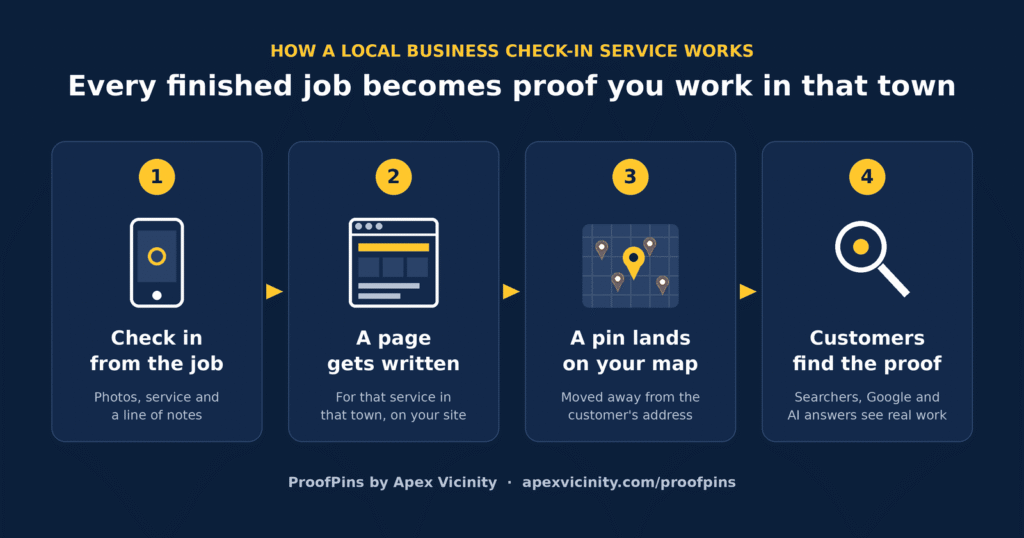
A local business check-in service is software for companies that do their work at the customer’s home or site. When a job is done, the tech checks in from a phone. The check-in records the service, a few photos and the town, and then the service publishes it.
That makes it different from visitor check-in apps like Envoy or Sign In App, which log guests at an office front desk. It’s also different from an employee time clock. In short, a check-in service is a marketing tool, not a security or payroll tool.
How Do Job Check-Ins Help SEO for Businesses That Travel?
Google explains that local results are “mainly based on relevance, distance, and popularity.” For a business that drives to its customers, distance works against every town except the one on its listing. So a local business check-in service helps where you can make a difference: relevance and popularity.
Relevance: Proof of What You Do and Where
Google says businesses “with complete and accurate info are more likely to show up in local search results.” Each check-in adds a specific service in a specific town. As a result, your website covers the searches people actually make, for example “water heater repair in Frisco.”
Popularity: Reviews, Links and Real Work
Google also notes that prominence depends on “how many websites link to your business and how many reviews you have.” A check-in is the natural moment to ask for a review, because the customer is looking at the finished job. Meanwhile, fresh pages about real work give other sites something worth linking to.
Experience: First-Hand Proof Google Trusts
Google’s guidance on helpful content asks whether a page shows expertise “from having actually used a product or service, or visiting a place.” A job page with real photos from a real street nearby is exactly that kind of first-hand proof.
To be clear, Google doesn’t list check-ins as a ranking factor, and no tool can guarantee a ranking. As Google puts it, “There’s no way to request or pay for a better local ranking.” Instead, check-ins work because they feed the factors Google does use.
Where a Local Business Check-In Service Puts Your Jobs
Every local business check-in service publishes your jobs somewhere. However, where they end up decides who gets the SEO value.
On your own website. Each job becomes a real page on your domain, so the search value builds on your site and stays if you switch tools.
In a widget or embed. A script shows your jobs on your site, but the content loads from the vendor. If you cancel, the widget usually stops.
On a directory profile. The check-in posts to your listing on the vendor's own directory. That mostly helps the directory's domain rather than yours.
So before you choose, ask one question: if I cancel, what happens to my check-ins?
Local Business Check-In Services Compared
Here are the main options service businesses use. Each detail comes from the company’s own website as of October 2026, so check their sites before you buy.
If you're on a phone, swipe the table sideways to see every column.
| Service | Starting price | Where check-ins appear | What your crew uses |
|---|---|---|---|
| ProofPins (Apex Vicinity) | $97/mo | Real pages on your WordPress site | A phone link, or a label if you use CompanyCam |
| EZlocal Check-ins | $39/mo with Dash Pro | Your EZlocal directory profile, synced to Google | Dash by EZlocal |
| Nearby Now | $155/mo | City pages on your site through its plugin | The Nearby Now app |
| DataPins | Not published | Your service and city pages | The DataPins app |
| Map Check-Ins | Not published | Your Google Business Profile and a website widget | The Map Check-Ins app |
| Augernaut Jobsite Pins | $500/mo | Pages on your site, done for you | Nothing, since jobs come from your CRM |
How to Choose a Local Business Check-In Service
Most tools look alike on a sales page. Instead, compare them on these six points.
- Ownership. First, the pages should live on your own domain and stay if you leave.
- Crew effort. If checking in takes more than a minute, it won't happen on busy days.
- Write-ups. A check-in with one line of text makes a thin page, so look for help writing it.
- Privacy. Pins should be moved away from the customer's address, and photo GPS data should be removed.
- Reviews. Because the check-in is the best moment to ask, the tool should make that one tap.
- Price. Finally, compare the monthly cost with what one extra job is worth to you.
Which Businesses Use a Local Business Check-In Service?
Any business that goes to its customers can use one. For example, roofers, HVAC and plumbing companies, electricians, remodelers, landscapers, pressure washers and home cleaners all fit.
It also works for pest control, mobile mechanics, auto detailers, mobile pet groomers, personal chefs, caterers and mobile hair stylists. In every case, each visit becomes proof that you work in that town.
Where ProofPins Fits
ProofPins is the local business check-in service we built at Apex Vicinity. It runs inside your WordPress site, so every check-in becomes a real page that you own. Then AI drafts the write-up, the pin is moved away from the customer’s address, and your office approves each page before it goes live.
If that sounds right for your business, see how ProofPins works and what it costs.
Local Business Check-In Service FAQ
What does a job check-in service do?
It lets a business that travels to its customers log each finished job with photos and a location. The service then publishes that proof, so customers and search engines can see where you work.
Do check-ins help Google Maps rankings?
They can help, but not directly. Google doesn’t name check-ins as a ranking factor. Instead, check-ins add relevant pages, photos and review requests, and those feed the relevance and popularity factors Google says it uses.
Is a check-in service the same as a visitor check-in app?
No. Visitor check-in apps log guests at an office, while a local business check-in service turns finished jobs into marketing. They solve different problems, even though the names sound alike.
How much do job check-in services cost?
In October 2026, published prices ran from $39 a month, when bundled with directory listings, to $500 a month for a done-for-you service. ProofPins costs $97 to $197 a month.
Will check-ins show my customers' addresses?
That depends on the tool. Choose one that moves each pin away from the real address and strips GPS data from photos. ProofPins does both, and it never stores customer names or street addresses.
Do I need CompanyCam or a special app?
Not always. Some services require their own app, while others work from a simple phone link. ProofPins works either way, so crews can use a link or a CompanyCam label.
Is ProofPins the same as Proofing Pins?
No. ProofPins is the local business check-in service from Apex Vicinity, and it turns finished jobs into pages on your own website. Proofing Pins is a separate WordPress plugin for client feedback on web designs, while ProofPin is a social-proof popup script. So check the name and the maker before you install.
Try a Local Business Check-In Service You Own
See a local business check-in service running on a real website in a 15-minute demo, then decide.